
Does AI belong in the dinner rush? Restaurant operators are finding out

By Caroline Price for Toast

It’s 11:40 a.m., and the invoices from the morning delivery are still stacked by the pass. Two servers have asked to swap shifts, and the pre-shift meeting notes are half-written on a check pad. You have a cook waiting on the prep list, a driver knocking at the back dock, and lunch starting in twenty minutes.
Figuring out what that delivery actually cost, or whether the swap puts someone into overtime, used to mean walking back to the office and pulling a report that was stale by the time it loaded. Some operators now get those answers through AI without leaving the floor. So what does that mean for a business built on hospitality?
To find out, Toast looked at proprietary aggregated, anonymized usage data from the AI assistant built into the Toast platform, across Q2 2026. It shows what managers ask when they can query their numbers mid-shift, which device they ask from, and what they change once they have the answer. All three look different depending on the kind of restaurant.
Key takeaways:
- Real-Time Sales Focus: Sales and revenue queries represented 30% of total platform threads, making it the most active usage category.
- Defensive Discount Audits: Discount tracking accounted for 62% of all loss prevention and defensive auditing inquiries.
- Operational Style Shapes AI Reliance: Fine dining location managers asked 67% more conversational queries per store than fast casual operators.
- Usage Is Mobile-First: 54% of user-initiated AI interactions originated from mobile devices rather than back-office desktop computers.
- Answers Become Actions: Roughly 12% of menu and inventory queries ended in a follow-up action to the restaurant, most often taking an out-of-stock item off the menu.
- Prompts Cluster in the Rush: 53% of all prompts landed during peak lunch or peak dinner service, against 15% at nightly close.
Sales tracking is the platform’s most active topic, making up 30% of all user searches in Q2. Discount tracking alone made up 62% of all loss prevention searches.
Managers are asking questions in plain language to understand real-time performance that a static monthly P&L can’t answer.
Sales and revenue threads were the number one topic, taking up 30% of all user-initiated threads. Fine dining managers also directed 8% of their sales threads toward employee and server performance, nearly four times the rate of fast casual operators (2%).
Menu management and labor tracking each represented 8% of total platform threads. When auditing losses, managers directed 62% of searches at discount tracking, 25% at check voids, and 14% at manager comps. Fine dining stores doubled the platform average for manager comp review at 29%.
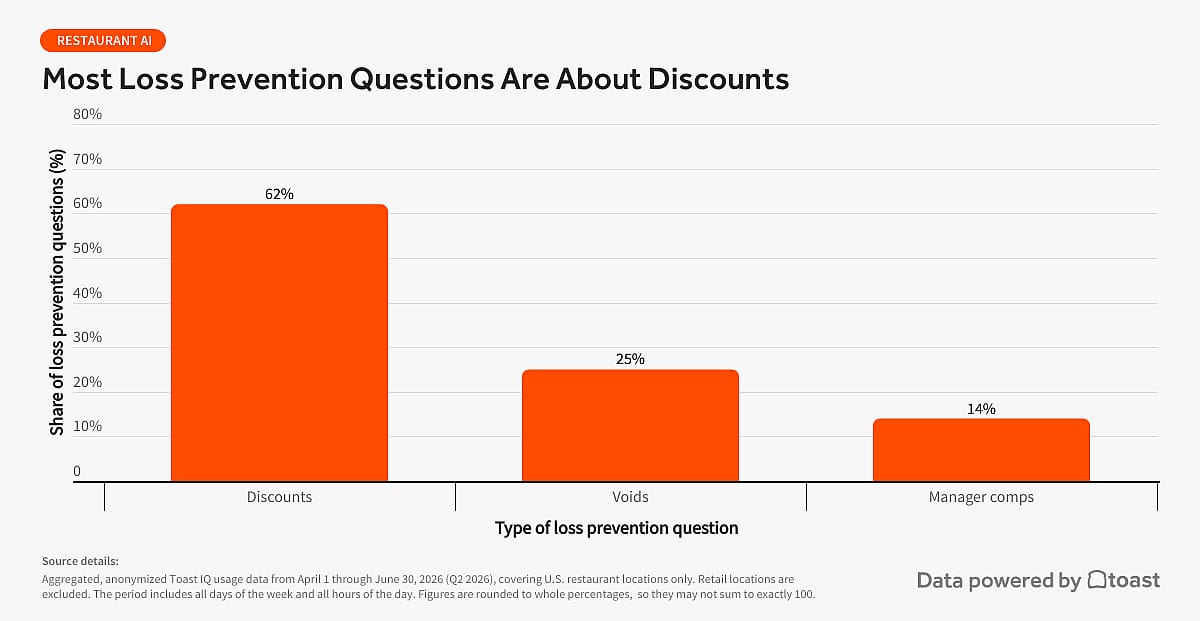
The value of these reviews depends on when they happen. Caught during service, a void anomaly or an unauthorized discount spike can still be addressed before the night closes.
How to test this in your business: Don’t wait for your end-of-month P&L to hunt down margin leaks. Make real-time discount and comp auditing a mid-shift habit. Have managers review live check voids and manager comps on the floor halfway through dinner service. Catching a void anomaly or an unauthorized discount spike during shift hours lets you resolve register errors and waste before the money leaves the building.
What Are the Top Actions Executed Through an AI Assistant?
Removing out-of-stock items from the menu is the top action managers executed in chat, and fixing employee clock-in times ranked third.
Sometimes the question and the change happen in the same conversation. Instead of digging through settings menus, managers are making updates directly inside the chat window.
Roughly 12% of menu and inventory queries ended in a follow-up action to the restaurant. Menu work accounted for 72% of all direct actions on the platform. Taking out-of-stock items off the menu (86ing) led by a wide margin at 31% of all actions. Updating item prices and details came second at 12%, editing shift punches third at 11%, and adding new items fourth at 7%.
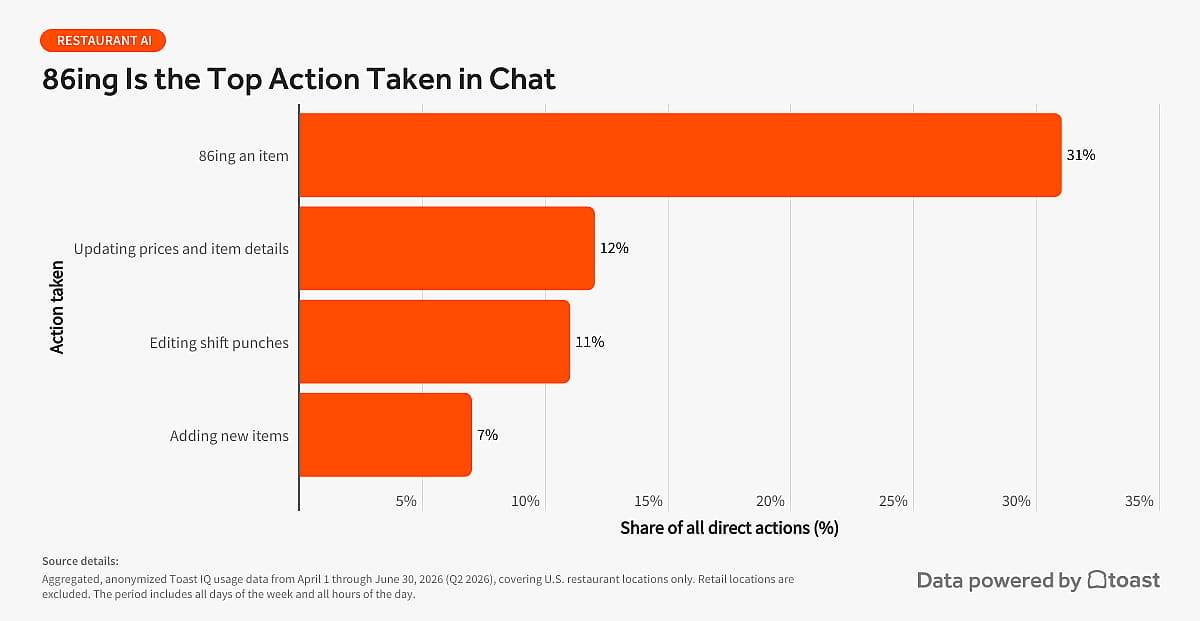
How to test this in your business: Use chat commands to handle quick operational fixes right on the line. When the kitchen runs out of a key item, have your manager 86 the item directly through chat on a mobile device instead of stepping into the back office to update POS settings. Encourage staff to use tap-and-go shortcut prompts to fix clock-in errors instantly, saving time and keeping payroll records accurate.
How Does Restaurant AI Use Change by Concept?
Fine dining operators sent the highest volume of prompts per store of any concept, and full-service restaurants ran 41% more AI queries per store than fast casual restaurants. Fast casual led in a different direction, sending payment and tender questions at more than twice the fine dining rate (10% of their sales threads against 4%) and asking how one store compares with another about 50% more often.
A Friday dinner rush forces fast calls, but what you decide depends on the room. Fast casual concepts live on speed, and the numbers that matter are how fast tickets clear and where the line backs up. Fine dining runs on a different set of variables, so a manager might track table pacing, course timing, and server covers all at once.
Data suggests that operators adapt the AI assistant to match their specific operational pressures. Fast casual operators led platform usage in multi-unit scaling and payment analysis, directing 10% of their sales queries toward payment and tender breakdowns and 4% toward multi-location store comparisons. Both shares are the highest of any concept: Fast casual sends payment questions at more than twice the fine dining rate and store comparisons about 50% more often.
Meanwhile, fine dining managers entered 67% more prompts per location than fast casual managers. Full-service locations generated 41% more prompts per store, while casual full-service concepts prompted 38% more often than fast casual operations. Pizzerias also exceeded the baseline, running 33% more prompts per location vs. fast casual.
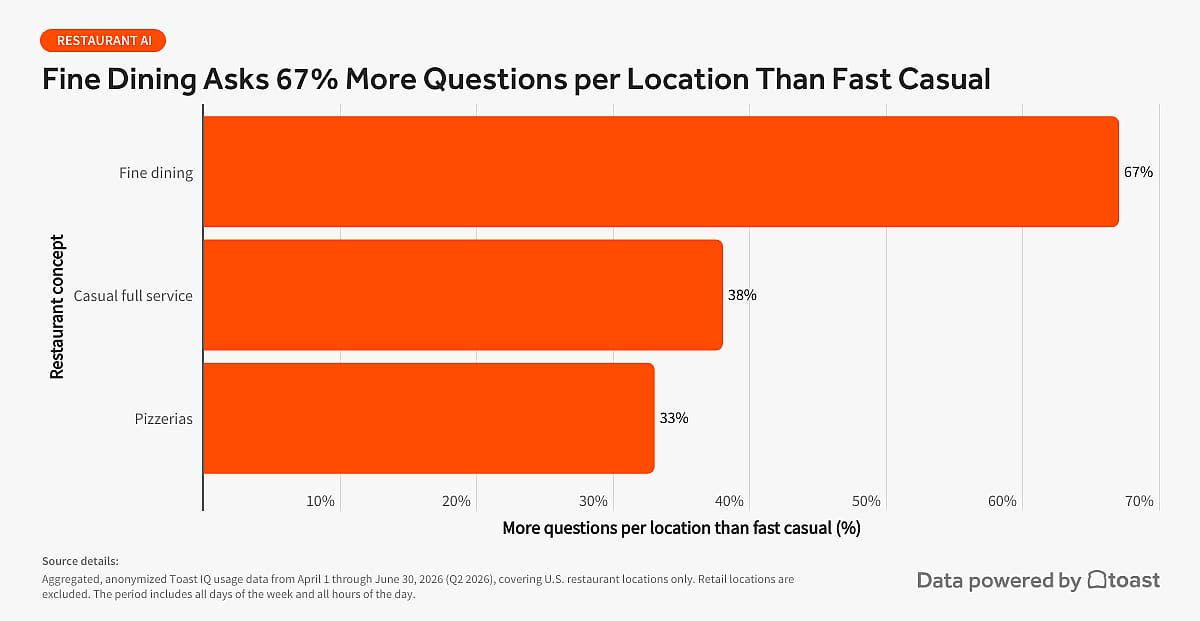
Because every concept carries unique margin risks, these usage patterns reveal how operators align AI with their specific floor priorities. No concept asked about payment or store-to-store comparison more than fast casual. Full-service operators asked about the room instead, checking how servers are doing and what’s actually selling, to stop labor and seating inefficiencies before the shift ends.
How to test this in your business: Match your AI routine to your service style. If you run fast casual, train your floor leaders to run checks on mobile during peak rushes to monitor station bottlenecks and payment splits. If you run full-service, encourage managers to use follow-up queries during table visits to check course pacing, beverage upsells, and server covers live without walking off the floor.
How Do Restaurant Managers Use Mobile vs. Desktop AI Tools?
Mobile devices accounted for 54% of all prompts across the platform, and fast casual operators ran 58% of theirs on mobile. But the administrative work hasn’t moved. Menu setups still happened mostly on office computers.
Which device managers use ebbs and flows with where they are needed most: grabbing a phone to stay on top of the shift in real time, or pulling up a seat in the back office to set up bigger changes.
Platform data showed a nearly even split between devices, with 54% of user prompts starting on mobile and 46% happening on desktop computers. Fine dining represented the desktop-majority cohort, running 54% of interactions on a desk setup, while fast casual managers leaned mobile-first, submitting 58% of their prompts on mobile devices.
The intent behind these inputs changed depending on the screen in hand. Sales-related prompts made up 40% of mobile activity compared to 19% on desktop. Managers also submitted 32% more labor and staffing prompts on mobile devices than on desktop setups. Meanwhile, bigger administrative tasks like menu builds happened 34% more often on office computers.
The timing data backs this up. Peak dinner accounted for 27% of all prompts and peak lunch for 26%, which puts 53% of everything managers ask squarely inside a rush. Morning prep took 19%, nightly close 15%, and the mid-day lull 13%. The questions cluster where service is heaviest.
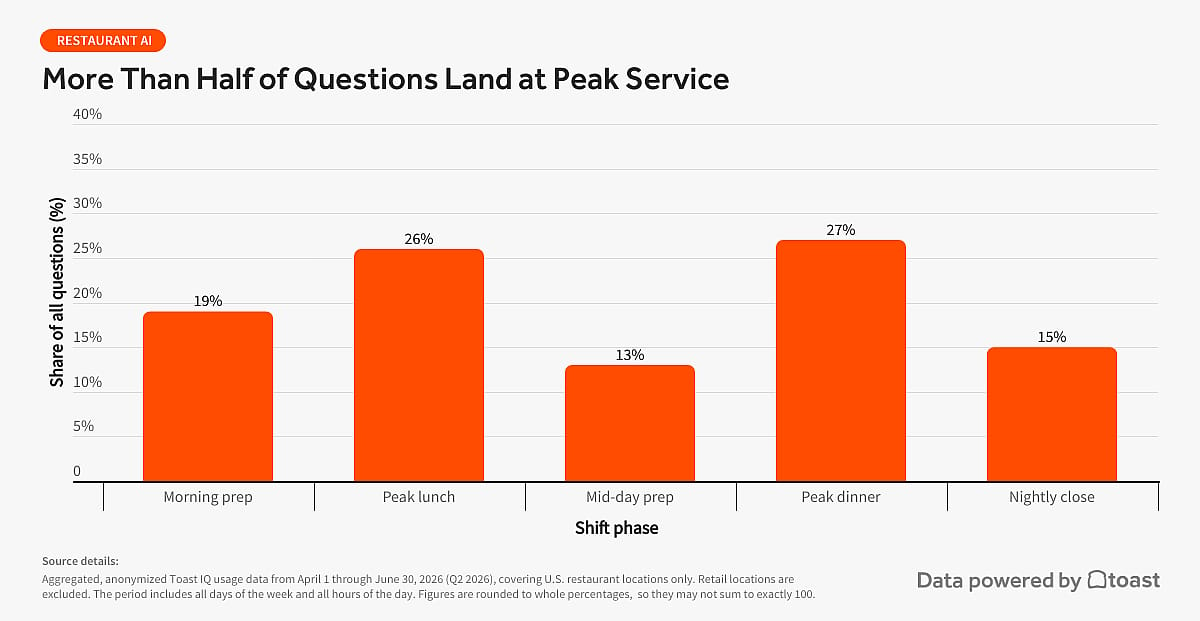
The split may have nothing to do with screen preference. A mobile device may mean the manager is on the floor, where there’s still time to act on what they find. When labor runs high at 7 p.m., a manager can shift coverage and head off the overtime before it ever accrues.
How to test this in your business: Put live floor checks on mobile and reserve the back office for setup work. Have your managers grab a mobile device during mid-shift lulls to check sales and labor percentage right from the pass. If sales fluctuate, adjust floor coverage on the spot. Save major menu rebuilds, pricing overhauls, and deep reporting for quiet back-office desktop sessions.
What Is the Operational Cost of Delaying AI Adoption?
The cost of waiting is everything that could have been fixed and wasn’t. Across a week of shifts, it could add up to real money.
When schedule tweaks, inventory updates, and clock-in fixes wait for late-night review, minor shift variances could compound before an operator can intervene.
A manager who checks labor from the pass, or catches a bad comp before the book closes, can still do something about it. The same numbers in tomorrow morning’s report only explain a night that has already been closed out.
Execution works the same way. Active managers can instantly 86 an out-of-stock item, update a price, or fix a clock-in error while service is happening. A missed void or thirty minutes of overtime may feel minor in isolation, but they may add up across a week of shifts.
Operators relying on post-shift reviews risk leaving comp patterns and discount anomalies unexamined until book-closing.
How to test this in your business: Audit your own lag. Pick a recent Friday and time-stamp three things: when a menu item ran out versus when it came off the menu, when a clock-in error happened versus when payroll caught it, and when your largest comp of the night was rung versus when a manager saw it. The gap between those pairs is your current cost of delay. Run the same check a month after putting live queries on mobile.
From the Back Office to the Floor
Since AI first showed up in restaurants, the question has been whether it has a place in a business built on genuine human interaction.
While AI has certainly unlocked back office efficiencies, it’s also on the floor in the thick of service. Most prompts land during the rush rather than after it, and roughly 1 in 8 menu questions ends with a follow-up action. Instant answers and quick actions may free operators to be more present on the floor.
This shifts the question: It’s not whether AI can have a place in hospitality, but whether AI, built intentionally for restaurant workflows, can actually make hospitality better.
Methodology
This report draws on aggregated, anonymized Toast AI assistant usage data from April 1 through June 30, 2026 (Q2 2026), covering U.S. restaurant locations only. Retail locations are excluded. The period includes all days of the week and all hours of the day. Figures are rounded to whole percentages, so they may not sum to exactly 100.
Prompts, queries, questions, and searches all refer to interactions a restaurant worker started, whether by typing a question or tapping a pre-set prompt on screen. This applies to every usage figure in the report, including the device split.
Topic categories, sub-topics, and the loss prevention and menu groupings were assigned by keyword and phrase matching against prompt text, not by a built-in product taxonomy. Categories are therefore approximate, and a prompt touching more than one subject may be counted under a single category.
This story was produced by Toast and reviewed and distributed by Stacker.
It’s 11:40 a.m., and the invoices from the morning delivery are still stacked by the pass. Two servers have asked to swap shifts, and the pre-shift meeting notes are half-written on a check pad. You have a cook waiting on the prep list, a driver knocking at the back dock, and lunch starting in twenty minutes.
Figuring out what that delivery actually cost, or whether the swap puts someone into overtime, used to mean walking back to the office and pulling a report that was stale by the time it loaded. Some operators now get those answers through AI without leaving the floor. So what does that mean for a business built on hospitality?
To find out, Toast looked at proprietary aggregated, anonymized usage data from the AI assistant built into the Toast platform, across Q2 2026. It shows what managers ask when they can query their numbers mid-shift, which device they ask from, and what they change once they have the answer. All three look different depending on the kind of restaurant.
Key takeaways:
- Real-Time Sales Focus: Sales and revenue queries represented 30% of total platform threads, making it the most active usage category.
- Defensive Discount Audits: Discount tracking accounted for 62% of all loss prevention and defensive auditing inquiries.
- Operational Style Shapes AI Reliance: Fine dining location managers asked 67% more conversational queries per store than fast casual operators.
- Usage Is Mobile-First: 54% of user-initiated AI interactions originated from mobile devices rather than back-office desktop computers.
- Answers Become Actions: Roughly 12% of menu and inventory queries ended in a follow-up action to the restaurant, most often taking an out-of-stock item off the menu.
- Prompts Cluster in the Rush: 53% of all prompts landed during peak lunch or peak dinner service, against 15% at nightly close.
How Are Operators Using Live Numbers to Protect Margins?
Sales tracking is the platform’s most active topic, making up 30% of all user searches in Q2. Discount tracking alone made up 62% of all loss prevention searches.
Managers are asking questions in plain language to understand real-time performance that a static monthly P&L can’t answer.
Sales and revenue threads were the number one topic, taking up 30% of all user-initiated threads. Fine dining managers also directed 8% of their sales threads toward employee and server performance, nearly four times the rate of fast casual operators (2%).
Menu management and labor tracking each represented 8% of total platform threads. When auditing losses, managers directed 62% of searches at discount tracking, 25% at check voids, and 14% at manager comps. Fine dining stores doubled the platform average for manager comp review at 29%.
The value of these reviews depends on when they happen. Caught during service, a void anomaly or an unauthorized discount spike can still be addressed before the night closes.
How to test this in your business: Don’t wait for your end-of-month P&L to hunt down margin leaks. Make real-time discount and comp auditing a mid-shift habit. Have managers review live check voids and manager comps on the floor halfway through dinner service. Catching a void anomaly or an unauthorized discount spike during shift hours lets you resolve register errors and waste before the money leaves the building.
What Are the Top Actions Executed Through an AI Assistant?
Removing out-of-stock items from the menu is the top action managers executed in chat, and fixing employee clock-in times ranked third.
Sometimes the question and the change happen in the same conversation. Instead of digging through settings menus, managers are making updates directly inside the chat window.
Roughly 12% of menu and inventory queries ended in a follow-up action to the restaurant. Menu work accounted for 72% of all direct actions on the platform. Taking out-of-stock items off the menu (86ing) led by a wide margin at 31% of all actions. Updating item prices and details came second at 12%, editing shift punches third at 11%, and adding new items fourth at 7%.
How to test this in your business: Use chat commands to handle quick operational fixes right on the line. When the kitchen runs out of a key item, have your manager 86 the item directly through chat on a mobile device instead of stepping into the back office to update POS settings. Encourage staff to use tap-and-go shortcut prompts to fix clock-in errors instantly, saving time and keeping payroll records accurate.
How Does Restaurant AI Use Change by Concept?
Fine dining operators sent the highest volume of prompts per store of any concept, and full-service restaurants ran 41% more AI queries per store than fast casual restaurants. Fast casual led in a different direction, sending payment and tender questions at more than twice the fine dining rate (10% of their sales threads against 4%) and asking how one store compares with another about 50% more often.
A Friday dinner rush forces fast calls, but what you decide depends on the room. Fast casual concepts live on speed, and the numbers that matter are how fast tickets clear and where the line backs up. Fine dining runs on a different set of variables, so a manager might track table pacing, course timing, and server covers all at once.
Data suggests that operators adapt the AI assistant to match their specific operational pressures. Fast casual operators led platform usage in multi-unit scaling and payment analysis, directing 10% of their sales queries toward payment and tender breakdowns and 4% toward multi-location store comparisons. Both shares are the highest of any concept: Fast casual sends payment questions at more than twice the fine dining rate and store comparisons about 50% more often.
Meanwhile, fine dining managers entered 67% more prompts per location than fast casual managers. Full-service locations generated 41% more prompts per store, while casual full-service concepts prompted 38% more often than fast casual operations. Pizzerias also exceeded the baseline, running 33% more prompts per location vs. fast casual.
Because every concept carries unique margin risks, these usage patterns reveal how operators align AI with their specific floor priorities. No concept asked about payment or store-to-store comparison more than fast casual. Full-service operators asked about the room instead, checking how servers are doing and what’s actually selling, to stop labor and seating inefficiencies before the shift ends.
How to test this in your business: Match your AI routine to your service style. If you run fast casual, train your floor leaders to run checks on mobile during peak rushes to monitor station bottlenecks and payment splits. If you run full-service, encourage managers to use follow-up queries during table visits to check course pacing, beverage upsells, and server covers live without walking off the floor.
How Do Restaurant Managers Use Mobile vs. Desktop AI Tools?
Mobile devices accounted for 54% of all prompts across the platform, and fast casual operators ran 58% of theirs on mobile. But the administrative work hasn’t moved. Menu setups still happened mostly on office computers.
Which device managers use ebbs and flows with where they are needed most: grabbing a phone to stay on top of the shift in real time, or pulling up a seat in the back office to set up bigger changes.
Platform data showed a nearly even split between devices, with 54% of user prompts starting on mobile and 46% happening on desktop computers. Fine dining represented the desktop-majority cohort, running 54% of interactions on a desk setup, while fast casual managers leaned mobile-first, submitting 58% of their prompts on mobile devices.
The intent behind these inputs changed depending on the screen in hand. Sales-related prompts made up 40% of mobile activity compared to 19% on desktop. Managers also submitted 32% more labor and staffing prompts on mobile devices than on desktop setups. Meanwhile, bigger administrative tasks like menu builds happened 34% more often on office computers.
The timing data backs this up. Peak dinner accounted for 27% of all prompts and peak lunch for 26%, which puts 53% of everything managers ask squarely inside a rush. Morning prep took 19%, nightly close 15%, and the mid-day lull 13%. The questions cluster where service is heaviest.
The split may have nothing to do with screen preference. A mobile device may mean the manager is on the floor, where there’s still time to act on what they find. When labor runs high at 7 p.m., a manager can shift coverage and head off the overtime before it ever accrues.
How to test this in your business: Put live floor checks on mobile and reserve the back office for setup work. Have your managers grab a mobile device during mid-shift lulls to check sales and labor percentage right from the pass. If sales fluctuate, adjust floor coverage on the spot. Save major menu rebuilds, pricing overhauls, and deep reporting for quiet back-office desktop sessions.
What Is the Operational Cost of Delaying AI Adoption?
The cost of waiting is everything that could have been fixed and wasn’t. Across a week of shifts, it could add up to real money.
When schedule tweaks, inventory updates, and clock-in fixes wait for late-night review, minor shift variances could compound before an operator can intervene.
A manager who checks labor from the pass, or catches a bad comp before the book closes, can still do something about it. The same numbers in tomorrow morning’s report only explain a night that has already been closed out.
Execution works the same way. Active managers can instantly 86 an out-of-stock item, update a price, or fix a clock-in error while service is happening. A missed void or thirty minutes of overtime may feel minor in isolation, but they may add up across a week of shifts.
Operators relying on post-shift reviews risk leaving comp patterns and discount anomalies unexamined until book-closing.
How to test this in your business: Audit your own lag. Pick a recent Friday and time-stamp three things: when a menu item ran out versus when it came off the menu, when a clock-in error happened versus when payroll caught it, and when your largest comp of the night was rung versus when a manager saw it. The gap between those pairs is your current cost of delay. Run the same check a month after putting live queries on mobile.
From the Back Office to the Floor
Since AI first showed up in restaurants, the question has been whether it has a place in a business built on genuine human interaction.
While AI has certainly unlocked back office efficiencies, it’s also on the floor in the thick of service. Most prompts land during the rush rather than after it, and roughly 1 in 8 menu questions ends with a follow-up action. Instant answers and quick actions may free operators to be more present on the floor.
This shifts the question: It’s not whether AI can have a place in hospitality, but whether AI, built intentionally for restaurant workflows, can actually make hospitality better.
Methodology
This report draws on aggregated, anonymized Toast AI assistant usage data from April 1 through June 30, 2026 (Q2 2026), covering U.S. restaurant locations only. Retail locations are excluded. The period includes all days of the week and all hours of the day. Figures are rounded to whole percentages, so they may not sum to exactly 100.
Prompts, queries, questions, and searches all refer to interactions a restaurant worker started, whether by typing a question or tapping a pre-set prompt on screen. This applies to every usage figure in the report, including the device split.
Topic categories, sub-topics, and the loss prevention and menu groupings were assigned by keyword and phrase matching against prompt text, not by a built-in product taxonomy. Categories are therefore approximate, and a prompt touching more than one subject may be counted under a single category.
This story was produced by Toast and reviewed and distributed by Stacker.
